

Chat Everywhere
You’ll see the chat button in various places around the app. Depending on context, you can:Chat with Data
Explore tables, understand schemas, and generate SQL to dive deep into blockchain data
Chat with Agents
Get highly curated results from specialized AI agents with domain expertise
Chat with Automations
Understand how data has changed from run to run and analyze trends over time
How It Works
Ask a question
Ask about any blockchain, protocol, token, or address. Include chain and contract context when
you know it.
Chat analyzes
Chat formulates a plan, writes SQL queries, runs analyses, and generates outputs (text, charts,
tables).
What You Can Do
Query Data
Ask questions and get answers backed by SQL queries:Analyze Patterns
Identify trends, anomalies, and opportunities:Generate Reports
Create charts, analysis, and shareable reports. Learn more about Reports.Run SQL Directly
Paste SQL queries for direct execution:Understanding Results
Flipside Data Boxes
Every query result appears in an expandable container showing:- Query preview: What was analyzed
- Results table: Data returned
- Full SQL: Complete query for verification
- Download: Export as CSV
Select an Agent
Choose which agent you want to chat with for specialized expertise. Each agent has different skills and domain knowledge.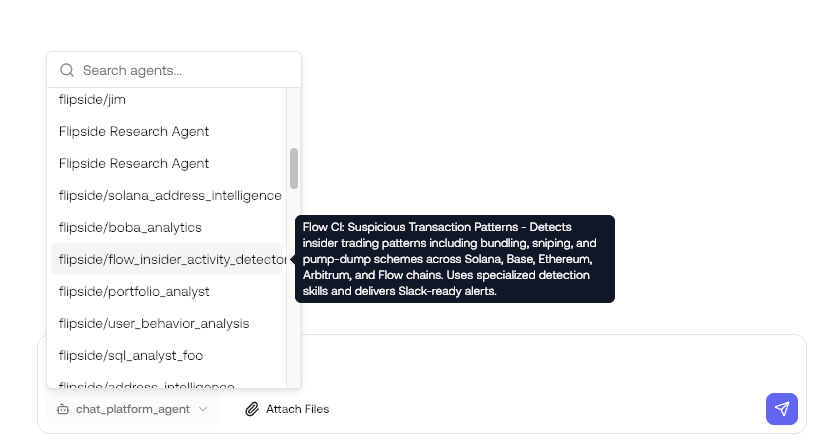
Sharing chats
Share chat sessions with colleagues to provide context or collaborate on complex queries.Shared chats are view-only. Recipients can see the full conversation history including tool calls
and data outputs, but cannot continue or fork the conversation.
Pro Tips
Be specific
Be specific
Vague questions get vague answers. Include:
- Chain names
- Time periods
- Contract addresses when known
- Specific metrics you want
Iterate
Iterate
The best insights come from follow-up questions: - “Why is this number so high?” - “Break this
down by day” - “Show me the top 10 instead of top 5”
Validate results
Validate results
Always verify important findings:
- Expand data boxes to check SQL
- Cross-reference with external sources
- Ask Chat to explain its methodology
Next Steps
Reports
Create shareable intelligence reports
Agents
Use specialized AI assistants
Automations
Apply structured methodologies
Queries
Save and manage your queries